
Druid Spring Boot Starter

English | 中文
Spring Boot with Druid support, help you simplify Druid config in Spring Boot.
Usage
-
Add the
druid-spring-boot-starterdependency in Spring Boot project.Maven<dependency> <groupId>com.alibaba</groupId> <artifactId>druid-spring-boot-starter</artifactId> <version>1.1.2</version> </dependency>Gradlecompile 'com.alibaba:druid-spring-boot-starter:1.1.2' -
Add configuration properties.
spring.datasource.url=
spring.datasource.username=
spring.datasource.password=
# ...other config (optional)
Configuration Properties
Druid Spring Boot Starter properties name in full compliance with Druid configuration, you can configure the Druid database connection pool and monitor the configuration properties through the following configuration properties, using default values if not configured.
- JDBC
spring.datasource.druid.url= # or spring.datasource.url=
spring.datasource.druid.username= # or spring.datasource.username=
spring.datasource.druid.password= # or spring.datasource.password=
spring.datasource.druid.driver-class-name= # or spring.datasource.driver-class-name=
- Connection pool
spring.datasource.druid.initial-size=
spring.datasource.druid.max-active=
spring.datasource.druid.min-idle=
spring.datasource.druid.max-wait=
spring.datasource.druid.pool-prepared-statements=
spring.datasource.druid.max-pool-prepared-statement-per-connection-size=
spring.datasource.druid.max-open-prepared-statements= #Equivalent to the above 'max-pool-prepared-statement-per-connection-size'
spring.datasource.druid.validation-query=
spring.datasource.druid.validation-query-timeout=
spring.datasource.druid.test-on-borrow=
spring.datasource.druid.test-on-return=
spring.datasource.druid.test-while-idle=
spring.datasource.druid.time-between-eviction-runs-millis=
spring.datasource.druid.min-evictable-idle-time-millis=
spring.datasource.druid.max-evictable-idle-time-millis=
spring.datasource.druid.filters= #Druid filters, default value stat, multiple separated by comma.
- Monitor
# WebStatFilter properties, detail see Druid Wiki
spring.datasource.druid.web-stat-filter.enabled= #Enable StatFilter, default value true.
spring.datasource.druid.web-stat-filter.url-pattern=
spring.datasource.druid.web-stat-filter.exclusions=
spring.datasource.druid.web-stat-filter.session-stat-enable=
spring.datasource.druid.web-stat-filter.session-stat-max-count=
spring.datasource.druid.web-stat-filter.principal-session-name=
spring.datasource.druid.web-stat-filter.principal-cookie-name=
spring.datasource.druid.web-stat-filter.profile-enable=

# StatViewServlet properties, detail see Druid Wiki
spring.datasource.druid.stat-view-servlet.enabled= #Enable StatViewServlet, default value true.
spring.datasource.druid.stat-view-servlet.url-pattern=
spring.datasource.druid.stat-view-servlet.reset-enable=
spring.datasource.druid.stat-view-servlet.login-username=
spring.datasource.druid.stat-view-servlet.login-password=
spring.datasource.druid.stat-view-servlet.allow=
spring.datasource.druid.stat-view-servlet.deny=

# With Spring monitoring properties, detail see Druid Wiki
spring.datasource.druid.aop-patterns= # Spring monitoring AOP point, such as x.y.z.service.*, multiple separated by comma.
# If 'spring.datasource.druid.aop-patterns' to be the agent class does not define interface need set 'spring.aop.proxy-target-class = true' .
The Druid Spring Boot Starter is not limited to support for the above configuration properties, and the configurable properties that provide the setter method in DruidDataSource will be supported. You can refer to the WIKI document or configure it via the IDE input prompt. The format of the configuration file You can choose .properties or .yml, the effect is the same, in the configuration of more cases recommend the use of .yml.
How to Configuration Multiple DataSource
- Add config
spring.datasource.url=
spring.datasource.username=
spring.datasource.password=

# DruidDataSurce configuration, extents spring.datasource. * configuration,,  the same will be replaced.
spring.datasource.druid.initial-size=5
spring.datasource.druid.max-active=5
...

# First DruidDataSurce configuration,extents spring.datasource.druid.* configuration, the same will be replaced.
...
spring.datasource.druid.one.max-active=10
spring.datasource.druid.one.max-wait=10000
...

# Second DruidDataSurce configuration,extents spring.datasource.druid.* configuration, the same will be replaced.
...
spring.datasource.druid.two.max-active=20
spring.datasource.druid.two.max-wait=20000
...
- Create DruidDataSource
@Primary
@Bean
@ConfigurationProperties("spring.datasource.druid.one")
public DataSource dataSourceOne(){
    return DruidDataSourceBuilder.create().build();
}
@Bean
@ConfigurationProperties("spring.datasource.druid.two")
public DataSource dataSourceTwo(){
    return DruidDataSourceBuilder.create().build();
}
How to Configuration Filter
You can spring.datasource.druid.filters = stat, wall, log4j, dtc. way to enable the corresponding built-in Filter, but these are the default configuration Filter. If the default configuration can not meet your needs, you can give up this way, through the configuration file to configure the Filter, the following is an example.
# StatFilter configuration example.
spring.datasource.druid.filter.stat.db-type=h2
spring.datasource.druid.filter.stat.log-slow-sql=true
spring.datasource.druid.filter.stat.slow-sql-millis=2000

# WallFilter configuration example
spring.datasource.druid.filter.wall.enabled=true
spring.datasource.druid.filter.wall.db-type=h2
spring.datasource.druid.filter.wall.config.delete-allow=false
spring.datasource.druid.filter.wall.config.drop-table-allow=false

# Other Filter similar.
Currently, configuration support is provided for the following filters. Please refer to the documentation or configure it according to the IDE prompt (spring.datasource.druid.filter. *).
- StatFilter
- WallFilter
- ConfigFilter
- EncodingConvertFilter
- Slf4jLogFilter
- Log4jFilter
- Log4j2Filter
- CommonsLogFilter
Druid Spring Boot Starter will enable StatFilter by default, and you can also set its enabled to false.,make the Filter configuration take effect and need to set enabled to true.
IDE Hints
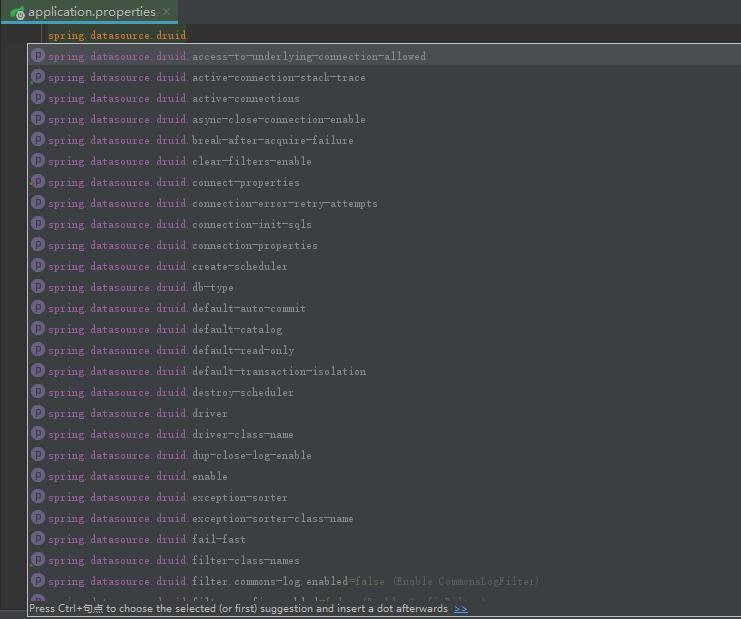
Samples
Clone the project, run DemoApplication within the test package.