mirror of
https://github.com/zuiidea/antd-admin
synced 2026-11-24 15:01:12 +00:00
Added docsify and update umi config.
This commit is contained in:
 zuiidea
@@ -9,6 +9,7 @@ export default {
|
||||
{
|
||||
dva: true,
|
||||
antd: true,
|
||||
dynamicImport: true,
|
||||
routes: {
|
||||
exclude: [
|
||||
/model\.(j|t)sx?$/,
|
||||
|
||||
+172
@@ -0,0 +1,172 @@
|
||||
# Antd Admin
|
||||
|
||||
[](https://github.com/facebook/react)
|
||||
[](https://github.com/ant-design/ant-design)
|
||||
[](https://github.com/dvajs/dva)
|
||||
|
||||
[](https://github.com/zuiidea/antd-admin)
|
||||
[](https://github.com/zuiidea/antd-admin/pulls)
|
||||
[](http://opensource.org/licenses/MIT)
|
||||
[](http://standardjs.com)
|
||||
|
||||
演示地址 <http://antd-admin.zuiidea.com>
|
||||
|
||||
## 特性
|
||||
|
||||
* 基于[react](https://github.com/facebook/react),[ant-design](https://github.com/ant-design/ant-design),[dva](https://github.com/dvajs/dva),[Mock](https://github.com/nuysoft/Mock) 企业级后台管理系统最佳实践。
|
||||
* 基于 Antd UI 设计语言,提供后台管理系统常见使用场景。
|
||||
* 基于[dva](https://github.com/dvajs/dva)动态加载 Model 和路由,按需加载。
|
||||
* 使用[umi](https://github.com/umijs/umi)本地调试和构建,其中 Mock 功能实现脱离后端独立开发。
|
||||
* 浅度响应式设计。
|
||||
|
||||
## 更新日志
|
||||
|
||||
### 5.0.0-beta
|
||||
|
||||
`2018-6-20`
|
||||
|
||||
* 感谢@sorrycc、@xiaohuoni [PR](https://github.com/zuiidea/antd-admin/pull/770)
|
||||
|
||||
* 更新`roadhog`至`umi`
|
||||
详见 [使用 umi 改进 dva 项目开发](https://github.com/sorrycc/blog/issues/66#issuecomment-408596579) | [umi model 用法](https://github.com/umijs/umi/issues/171)
|
||||
|
||||
### 4.3.9
|
||||
|
||||
`2017-12-27`
|
||||
|
||||
* 更新`antd`至`3.0.3`,以及其它主要库,并解决升级带来的兼容问题。
|
||||
* 尽可能的保持`antd`的设计语言。
|
||||
|
||||
### 4.3.7
|
||||
|
||||
`2017-10-30`
|
||||
|
||||
* 更新`chart`,新增[ECharts](https://github.com/ecomfe/echarts),[highCharts](https://github.com/highcharts/highcharts),[Recharts](https://github.com/recharts/recharts)演示。
|
||||
|
||||
### 4.3.5
|
||||
|
||||
`2017-09-04`
|
||||
|
||||
* 更新[dva](https://github.com/dvajs/dva)至`2.0.1`,感谢[@yangbin1994](https://github.com/yangbin1994)的[PR](https://github.com/zuiidea/antd-admin/pull/567)。
|
||||
|
||||
### 4.3.4
|
||||
|
||||
`2017-09-04`
|
||||
|
||||
* 更新[roadhog](https://github.com/sorrycc/roadhog)至`1.2.1`,修复闪屏问题。
|
||||
* 修复 build css 未压缩[#529](https://github.com/zuiidea/antd-admin/issues/529),classname 未 Hash[#477](https://github.com/zuiidea/antd-admin/issues/477)。
|
||||
* 更新登录成功使用 router 跳转[#479](https://github.com/zuiidea/antd-admin/issues/479)。
|
||||
|
||||
### 4.3.0
|
||||
|
||||
`2017-07-30`
|
||||
|
||||
* 更新[roadhog](https://github.com/sorrycc/roadhog)至`1.0.0-beta.7`,得益于`webpack@3.4`,编译速度不减。
|
||||
* 基于使用 roadhog 的 dll 插件,开发时编译耗时减半。
|
||||
* 新增打包时按项目版本号生成文件目录。[#449](https://github.com/zuiidea/antd-admin/issues/449)
|
||||
* 更新`eslint`,并适当修改了`.eslintrc`。
|
||||
|
||||
[More Change Log](https://github.com/zuiidea/antd-admin/wiki/Change-Log)
|
||||
|
||||
## 开发构建
|
||||
|
||||
### 目录结构
|
||||
|
||||
```bash
|
||||
├── /dist/ # 项目输出目录
|
||||
├── /mock/ # 数据mock
|
||||
├── /public/ # 公共文件,编译时copy至dist目录
|
||||
├── /src/ # 项目源码目录
|
||||
│ ├── /components/ # UI组件及UI相关方法
|
||||
│ ├── /layouts/ # 全局组件
|
||||
│ │ └── app.js # 页面入口
|
||||
│ │ └── index.js # 入口文件
|
||||
│ ├── /models/ # 数据模型
|
||||
│ ├── /pages/ # 页面组件
|
||||
│ │ └── document.ejs # html模版
|
||||
│ ├── /services/ # 数据接口
|
||||
│ ├── /themes/ # 项目样式
|
||||
│ │ ├── default.less # 全局样式
|
||||
│ │ └── vars.less # 全局样式变量
|
||||
│ ├── /utils/ # 工具函数
|
||||
│ │ ├── config.js # 项目常规配置
|
||||
│ │ ├── menu.js # 菜单及面包屑配置
|
||||
│ │ ├── config.js # 项目常规配置
|
||||
│ │ ├── request.js # 异步请求函数(axios)
|
||||
│ │ └── theme.js # 项目需要在js中使用到样式变量
|
||||
├── package.json # 项目信息
|
||||
├── .eslintrc # Eslint配置
|
||||
└── .umirc.js # umi配置
|
||||
└── .umirc.mock.js # mock配置
|
||||
└── .theme.config.js # 主题less编译配置
|
||||
```
|
||||
pages中可参考 [duck 模式](https://medium.freecodecamp.org/scaling-your-redux-app-with-ducks-6115955638be)
|
||||
|
||||
文件夹命名说明:
|
||||
|
||||
* components:组件(方法)为单位以文件夹保存,文件夹名组件首字母大写(如`DataTable`),方法首字母小写(如`layer`),文件夹内主文件与文件夹同名,多文件以`index.js`导出对象(如`./src/components/Layout`)。
|
||||
* routes:页面为单位以文件夹保存,文件夹名首字母小写(特殊除外,如`UIElement`),文件夹内主文件以`index.js`导出,多文件时可建立`components`文件夹(如`./src/routes/dashboard`),如果有子路由,依次按照路由层次建立文件夹(如`./src/routes/UIElement`)。
|
||||
|
||||
### 快速开始
|
||||
|
||||
克隆项目文件:
|
||||
|
||||
```bash
|
||||
git clone https://github.com/zuiidea/antd-admin.git
|
||||
```
|
||||
|
||||
进入目录安装依赖:
|
||||
|
||||
```bash
|
||||
#开始前请确保没有安装roadhog、webpack到NPM全局目录, 国内用户推荐yarn或者cnpm
|
||||
npm i 或者 yarn install
|
||||
```
|
||||
|
||||
开发:
|
||||
|
||||
```bash
|
||||
npm run start
|
||||
打开 http://localhost:8000 #端口在package.json中cross-env后加上 PORT=8000指定
|
||||
```
|
||||
|
||||
构建:
|
||||
[详情](https://github.com/zuiidea/antd-admin/issues/269)
|
||||
|
||||
代码检测:
|
||||
|
||||
```bash
|
||||
npm run lint
|
||||
```
|
||||
|
||||
## FAQ
|
||||
|
||||
* 项目打包后如何部署? [#269](https://github.com/zuiidea/antd-admin/issues/269)
|
||||
* 如何做权限管理? [#384](https://github.com/zuiidea/antd-admin/issues/384)
|
||||
* 如何使用 mock.js 模拟接口,怎么使用线上接口? [#348](https://github.com/zuiidea/antd-admin/issues/348)
|
||||
* 如何使用 Iconfont,如何使用本地的 svg 图标? [#270](https://github.com/zuiidea/antd-admin/issues/270)
|
||||
* 怎么按版本打包,上线时不影响正在访问的用户? [#449](https://github.com/zuiidea/antd-admin/issues/449)
|
||||
* windows 处理 CRLF?[参考](http://blog.csdn.net/lysc_forever/article/details/42835203)
|
||||
|
||||
```bash
|
||||
git config --global core.autocrlf false
|
||||
```
|
||||
|
||||
## 参考
|
||||
|
||||
用户列表:<https://github.com/dvajs/dva/tree/master/examples/user-dashboard>
|
||||
|
||||
dashboard 设计稿:<https://dribbble.com/shots/3108122-Dashboard-Admin> (已征得作者同意)
|
||||
|
||||
## 截屏
|
||||
|
||||
web
|
||||
|
||||

|
||||
|
||||
移动
|
||||
|
||||
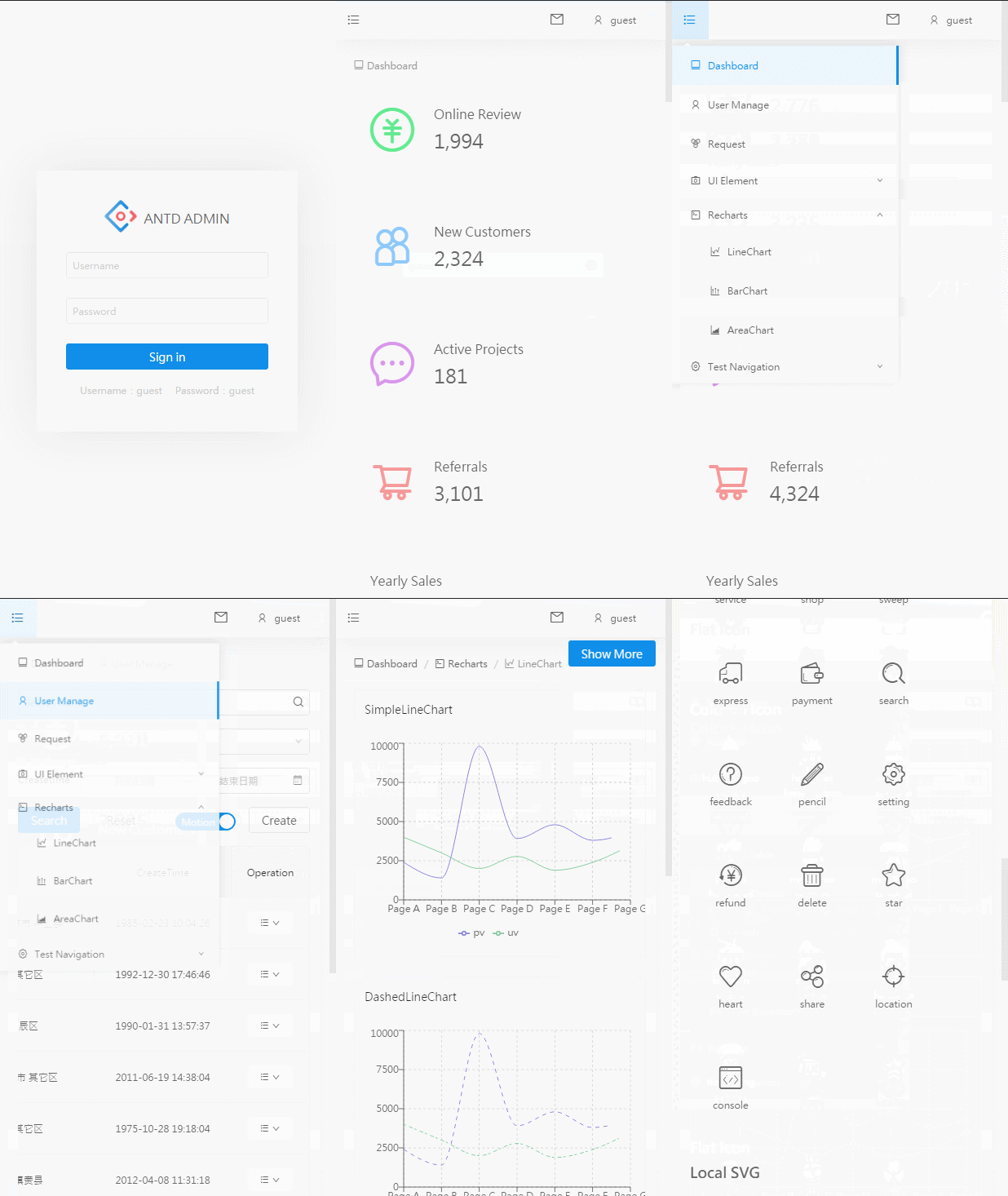
|
||||
|
||||
效果图
|
||||
|
||||

|
||||
@@ -0,0 +1,21 @@
|
||||
<!DOCTYPE html>
|
||||
<html lang="en">
|
||||
<head>
|
||||
<meta charset="UTF-8">
|
||||
<title>antd-admin - An admin dashboard application demo built upon Ant Design and UmiJS</title>
|
||||
<meta http-equiv="X-UA-Compatible" content="IE=edge,chrome=1" />
|
||||
<meta name="description" content="An admin dashboard application demo built upon Ant Design and UmiJS">
|
||||
<meta name="viewport" content="width=device-width, user-scalable=no, initial-scale=1.0, maximum-scale=1.0, minimum-scale=1.0">
|
||||
<link rel="stylesheet" href="//unpkg.com/docsify/lib/themes/vue.css">
|
||||
</head>
|
||||
<body>
|
||||
<div id="app"></div>
|
||||
<script>
|
||||
window.$docsify = {
|
||||
name: 'antd-admin',
|
||||
repo: ''
|
||||
}
|
||||
</script>
|
||||
<script src="//unpkg.com/docsify/lib/docsify.min.js"></script>
|
||||
</body>
|
||||
</html>
|
||||
@@ -6,8 +6,6 @@ module.exports = {
|
||||
prefix: 'antdAdmin',
|
||||
footerText: 'Ant Design Admin © 2018 zuiidea',
|
||||
logo: '/public/logo.svg',
|
||||
CORS: [],
|
||||
openPages: ['/login'],
|
||||
apiPrefix: '/api/v1',
|
||||
APIV1,
|
||||
APIV2,
|
||||
|
||||
Reference in New Issue
Block a user